Tattoo Scheduling Software Comparison: Finding the Right Fit
There’s no single “best” tattoo scheduling software. There’s only the right fit for your studio.
A solo artist working from home has different needs than a six-chair shop in downtown Austin. The platform that works perfectly for one studio might be complete overkill—or totally inadequate—for another.
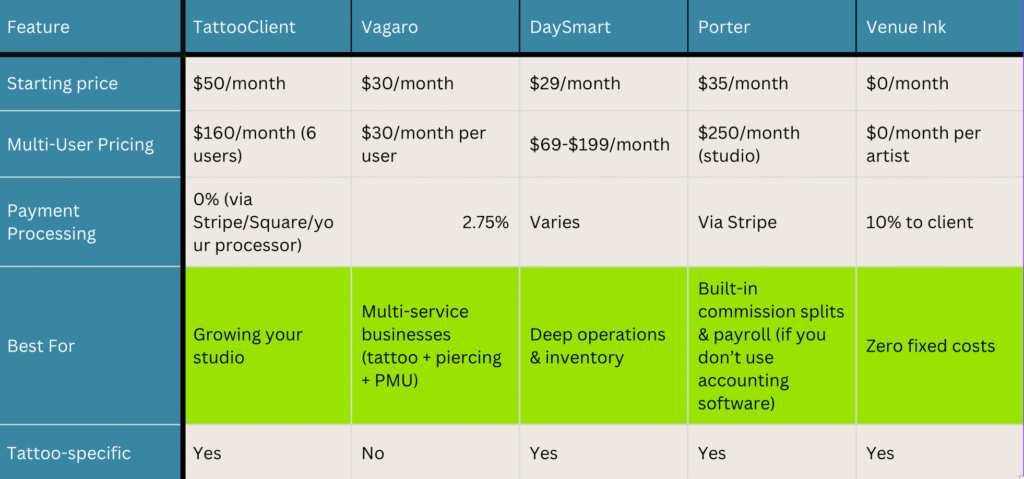
This comparison breaks down five major platforms honestly. We’ll show you where each one excels, what it actually costs (including the fees most companies hide), and who it’s built for.

TattooClient – Best for Business Growth & Revenue Protection
TattooClient is an all-in-one CRM and automation platform built on enterprise-level infrastructure. The focus is business growth through revenue protection—automated booking, mandatory deposits, and comprehensive client management that eliminates no-shows.
The 24/7 booking system runs without you touching it. Clients book online, deposits get collected automatically, reminders go out on schedule, and your calendar stays full with people who actually show up.
Built-in tap-to-pay through the mobile app connects to your existing payment processor—no extra hardware required. The mobile app mirrors everything you can do on desktop, so you’re managing your business from anywhere.
Track revenue by artist through detailed reporting. QuickBooks Online integration handles the accounting side—payroll, commission calculations, and tax reporting flow directly to your accountant’s preferred platform.
Pricing:
- Solo artists: $50/month
- Studios (up to 6 artists): $160/month
- Payment processing: 0% fees—integrate with Stripe, Square, or your preferred processor
- Tap-to-pay: Included free in mobile app
Best for:
- Studios focused on maximizing revenue per artist
- Multi-location operations needing centralized management
- Businesses wanting comprehensive automation beyond basic booking
- Operations already using QuickBooks Online for accounting
Vagaro – Best for Multi-Service Businesses
Vagaro dominates the beauty and wellness space for good reason. It’s versatile, widely adopted, and offers a marketplace where potential clients can discover your business.
The platform handles everything from scheduling to marketing to payroll. If your studio offers tattoos, piercings, permanent makeup, and retail products, Vagaro’s flexibility shines.
The catch? Features cost extra. Forms, text marketing, branded apps, and integrations each add to your monthly bill. What starts at $30 can climb quickly.
Pricing:
- Starting: $30/month for one calendar
- Additional users: +$10/month each
- Payment processing: 2.75%+ per transaction
- Add-ons: Forms ($10/mo), Branded app (custom pricing), Payroll (separate fee)
Best for:
- Studios offering multiple service types beyond tattooing
- Businesses wanting marketplace exposure to attract new clients
- Shops comfortable with per-feature pricing models
DaySmart Body Art – Best for Operations-Focused Studios
DaySmart Body Art (formerly InkBook) is operations software first, booking software second. The platform targets tattoo and piercing studios that need to run their business like a business—not just schedule appointments.
Inventory tracking, detailed financial reporting, staff management, and operational analytics dominate the feature set. Studios tracking significant product inventory, managing complex payroll structures, and running detailed performance reports appreciate what DaySmart prioritizes.
This isn’t for artists who just want to book clients and get paid. It’s for studio owners who want to see profit margins by artist, track supply costs against revenue, and generate reports for their accountant without manually pulling data.
Setup takes time and the learning curve is real. But studios with dedicated managers or owners focused on operational efficiency find the depth worthwhile.
Pricing:
- Basic: $29/month
- Mid-tier (with POS): $69/month
- Premium: $199/month
- Custom enterprise pricing available
Best for:
- Studio owners treating their business like a business
- Operations requiring detailed inventory and supply tracking
- Shops needing comprehensive financial and performance reporting
- Multi-artist studios where operational data drives decision-making

Porter – Best for In-House Commission & Payroll Management
Porter was built exclusively for tattoo artists by people who understand the industry. The request-based booking flow matches how tattoo artists actually work—clients submit requests, artists review and approve, then scheduling happens.
The differentiator is automated commission splits and payroll management built directly into the platform. Every transaction automatically calculates artist commissions based on your rates. Guest artist management is baked in. The system issues 1099-Ks for credit card payments received through Porter.
POS hardware integrates directly with bookings, so checkout includes tips calculated on the full amount (including deposits already paid). Marketing tools help with retargeting and flash sales.
If you want commission calculations, payroll, and artist payouts handled inside your scheduling software instead of through QuickBooks, Porter built exactly that.
Pricing:
- Artist Essentials: $35/month
- Artist Pro: $65/month (includes marketing tools, automated waivers)
- Studio Pro: $250/month (multi-artist management, commission automation, payroll)
- POS hardware: $400-$1,000 (one-time purchase or payment plan)
Best for:
- Studios wanting commission splits calculated automatically within the platform
- Operations needing built-in payroll management without external accounting software
- Artists who want tattoo-specific workflows and features
- Multi-artist shops where automated payout calculations matter more than accounting integration

Venue Ink – Best for Artists on a Budget
Venue Ink flips the pricing model. Artists pay nothing. Clients pay a 10% booking fee on deposits and payments, which covers all platform costs and payment processing.
The interface is clean, mobile-first, and simple. Flash management features let artists upload available designs, and clients can browse and book directly. The platform is growing fast and adding studio features like payroll and guest spot management.
Zero monthly expense makes Venue Ink appealing for artists just starting out or those who want to eliminate fixed costs entirely.
Pricing:
- Artists: $0/month
- Booking fee: 10% charged to clients (covers platform + processing)
- No subscription, setup fees, or hidden costs
Best for:
- Solo artists starting out or working part-time
- Artists who want zero monthly overhead
- Mobile-first workflows where phone management is primary
- Simple booking needs without complex studio features
What Actually Matters When Choosing
Monthly subscription prices tell you almost nothing about real costs.
A studio processing $10,000 monthly in deposits pays $3,480 annually at standard 2.75% rates. Platforms with zero processing fees save that entire amount. The “expensive” software becomes the cheapest option when you calculate total costs.
Consider these factors:
Your studio size matters more than features lists. Solo artists need different tools than six-artist shops. Multi-location operations need centralized management that single-chair renters don’t.
Growth plans determine platform choice. If you’re building toward multiple locations, choose software that scales. If you’re staying solo indefinitely, simpler platforms work fine.
Workflow compatibility beats feature count. Request-approval booking works great for artists who curate their client list. Instant scheduling works better for shops filling chairs fast. Match the platform to how you actually work.
Learning curve impacts adoption. Comprehensive platforms take time to master. Simple platforms get you running fast but might lack features you’ll want later. Consider your team’s technical comfort level honestly.
The Honest Truth About “Best” Software
Every platform on this list solves the core problem—managing bookings, collecting payments, reducing no-shows. The differences matter for specific situations.
Venue Ink wins for zero upfront costs. Porter wins for built-in commission and payroll automation. DaySmart wins for operational depth and inventory management. Vagaro wins for multi-service versatility. TattooClient wins for total cost efficiency and accounting integration.
Choose based on your reality, not feature lists. A solo artist processing $3,000 monthly might prefer Venue Ink’s zero subscription over saving 10% in processing fees. A busy studio processing $20,000 monthly saves thousands annually with zero-fee platforms despite higher monthly costs.
Try free trials before committing. Every platform offers demos or trial periods. Use them. Test with your actual workflows, not theoretical scenarios.
The best software is the one you’ll actually use consistently. Features don’t matter if your team won’t adopt the platform.
Ready to see which platform fits your studio best? Book a TattooClient demo and compare features side-by-side with what you’re using now.
Frequently Asked Questions
What’s the real cost difference between these platforms?
Monthly subscription is only part of the equation. Payment processing fees often exceed subscription costs. A studio processing $10,000 monthly pays $275 in processing fees at 2.75% rates, which equals $3,300 annually. Zero-fee platforms save this entire amount even with higher monthly subscriptions. Calculate your actual processing volume to determine true costs, not just the advertised monthly price.
Can I switch between these platforms without losing client data?
Most platforms allow data export, but the process varies. Client names, contact info, and appointment history typically transfer via CSV files. Notes, custom fields, and platform-specific data may not migrate cleanly. Plan for manual cleanup when switching. Some platforms offer migration assistance—ask before committing. The transition typically takes 1-2 weeks depending on data volume and complexity.
Which platform is easiest to learn?
Venue Ink has the simplest interface—most artists are booking clients within hours. Porter and TattooClient offer moderate learning curves with comprehensive features accessible within days. DaySmart and Vagaro provide the most features but require more setup time and training. Consider your team’s technical comfort level and whether you have dedicated admin staff to manage implementation.
Do I need tattoo-specific software or will generic booking work?
Tattoo-specific platforms understand industry workflows—deposit collection, design approval processes, session-based scheduling, and aftercare follow-ups. Generic booking platforms work fine for basic scheduling but require workarounds for tattoo-specific needs. If you’re only booking appointments and collecting payments, generic works. If you need flash management, consent forms, and tattoo-specific client communication, choose industry-specific software.